claude-usage
Covers both Claude Code and Claude Cowork, plus Cursor if you use it. Extract usage metadata from your local Claude Code data (~/.claude), Claude Cowork sessions (the Claude desktop app’s agent mode) and, when it is installed, Cursor, and view it in one self-contained HTML dashboard. Filter by app, or compare them side by side. If there is no Cursor data, Cursor doesn’t appear anywhere in the dashboard.
Most usage tools only read Claude Code’s ~/.claude folder. Cowork keeps its sessions elsewhere (see Claude Cowork), and this tool reads both. See Cursor for what is read from Cursor.
Live demo (randomly generated sample data)
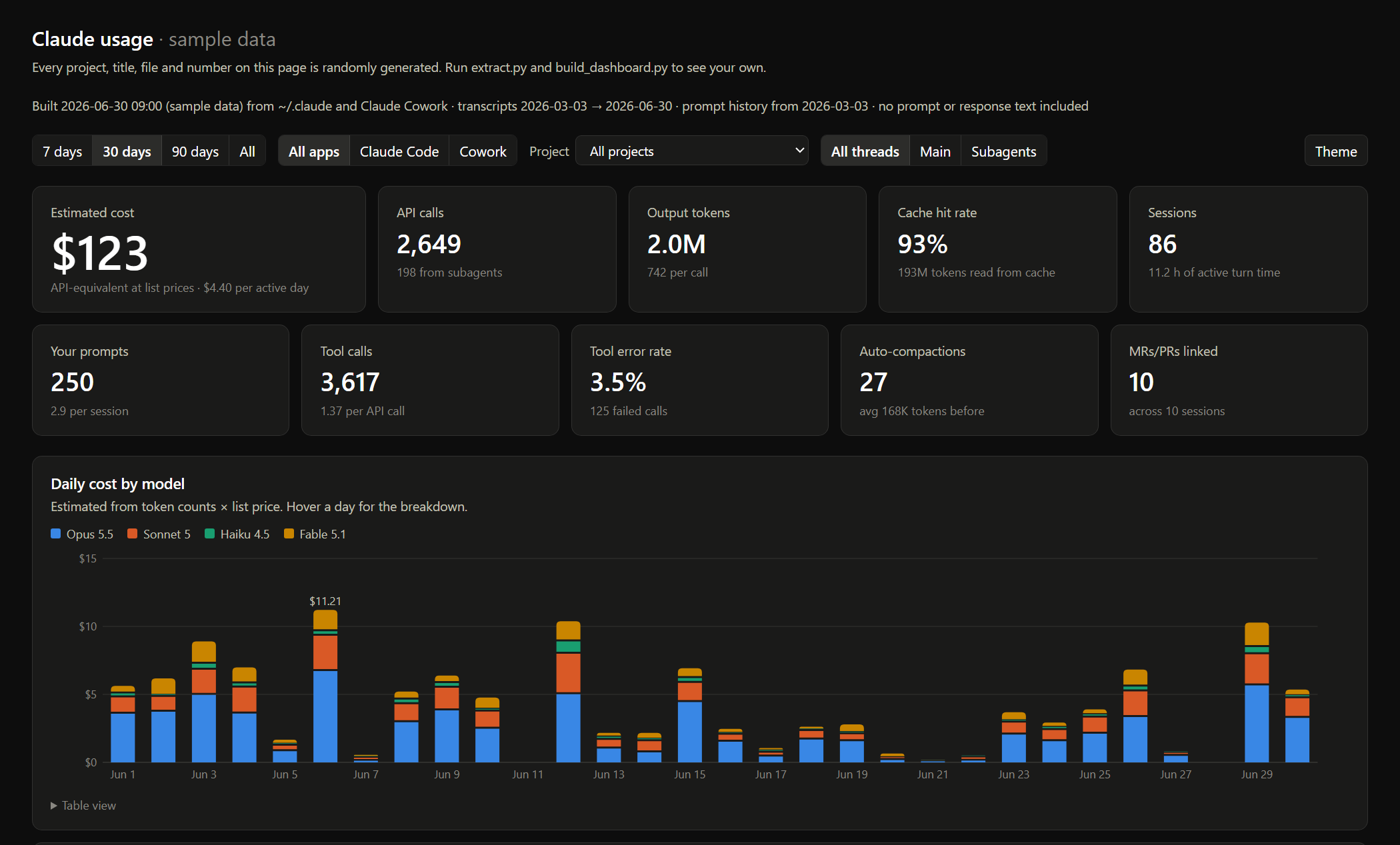
Records tokens, estimated cost, models, tools, latency, errors, subagents, compactions and activity timing. Prompt and response text is never extracted.
Python 3.10+ and the standard library are all you need: no dependencies, no network calls.
Usage
python extract.py                    # ~/.claude -> out/usage.sqlite + out/csv/*.csv
python build_dashboard.py --open     # -> out/dashboard.html
python build_artifact.py             # -> out/artifact.html, ready to publish as a claude.ai Artifact
skill/claude-usage-report.skill packages these scripts as a shareable skill. It contains no data; each person who runs it reads their own.
extract.py --no-titles omits auto-generated session titles. --no-cowork skips Cowork; --cowork-dir PATH points at a non-default Cowork folder. --no-cursor skips Cursor, --cursor-dir PATH points at a non-default Cursor folder, and --cursor-usage-csv FILE (repeatable) adds billed cost from a Cursor usage export.
Everything is written to out/, which is gitignored. Treat it as personal data.
What’s in the dashboard
- Filters: date range, app (Claude Code / Cowork / Cursor), project, main thread vs subagents, light/dark
- Headline numbers: estimated cost, API calls, output tokens, cache hit rate, sessions, prompts, tool calls, tool error rate, compactions
- Daily cost by model; cost by token type; main thread vs subagent cost
- Weekday x hour heatmaps of your prompts and of Claude’s API calls
- Top tools, MCP servers and shell programs, with error rate and latency
- Context size per call; weekly prompt history
- Sortable tables of sessions, most-touched files, skills and subagent types
- Cowork turns: recorded vs estimated cost, turn duration, time to first token, permission denials, scheduled vs interactive, rate-limit events
- Cursor: conversations, prompts, tool calls, agent line changes, assistant messages by model, modes, committed lines by author (agent / Tab / you), and billed usage if you import a CSV
Every chart has a table view.
Claude Cowork
Cowork (the Claude desktop app’s agent mode) doesn’t write to ~/.claude. Its sessions live in %APPDATA%\Claude\local-agent-mode-sessions on Windows and ~/Library/Application Support/Claude/local-agent-mode-sessions on macOS. Each session there has:
- Claude Code-format transcripts (
.claude/projects/**.jsonl), parsed the same way and tagged withsource = cowork audit.jsonl, the agent’s event log. Onlyresultrecords (one per finished turn: duration, time to first token, cost, denials) andrate_limit_eventrecords are read, into thecowork_turnsandrate_limit_eventstables. Message and result text are skipped.- A sibling
local_<id>.jsonper session. Only an allowlist of fields is read (title, created/last-active time, selected folder, scheduled or interactive). The account email, opening prompt and system prompt in that file are ignored.
A session’s project is the first folder you picked for it, or “Cowork: scheduled” / “Cowork: no folder”. Typed Cowork prompts carry no origin tag, so a non-subagent prompt that isn’t a tool result or harness message counts as yours.
Cursor
Cursor keeps its chat history in a SQLite database, %APPDATA%\Cursor\User\globalStorage\state.vscdb on Windows (~/Library/Application Support/Cursor/User/globalStorage/state.vscdb on macOS). It is opened read-only, and reading it takes a minute or two because the file is large. From it:
- Conversation headers (mode, created/updated time, workspace, lines added/removed), tagged
source = cursor. The project is the conversation’s workspace folder, or “Cursor: no folder”. - Each message’s type, model, timestamp and length, into
cursor_messages. User prompts also go intoprompts. Message text, thinking and rich text are never read. - Tool calls: tool name, status and the same light metadata as Claude Code (file paths, shell program, MCP server). Tool results are skipped.
~/.cursor/ai-tracking/ai-code-tracking.db: per-commit line counts split by agent, Tab and human, intocursor_commits. Commit messages are skipped.
The ItemTable in state.vscdb holds auth tokens and is never read.
Limits:
- Cursor has no cost data locally: it bills server-side and stopped storing token counts in early 2026. Cursor is left out of the cost charts unless you export your usage CSV from cursor.com/dashboard and pass it with
--cursor-usage-csv. That cost is billed, not estimated, and isn’t split by project. - Newer Cursor versions store some conversations in a binary format that isn’t parsed, so recent months may be undercounted.
- Messages are not API calls, so Cursor contributes nothing to the API call, token and context charts.
Notes
- Cost is an API-equivalent estimate (token counts x list price, from
PRICESinextract.py), not a bill. The cost Claude Code stores itself only covers the last process of a resumed session, so it is not used. Cowork does log a per-turn cost, which the dashboard shows next to the estimate as “recorded”. - Claude Code prunes old transcripts locally, so rerun
extract.pyregularly if you want long-term history. Prompt history (history.jsonl) usually goes back further. - Update
PRICESinextract.pywhen model pricing changes.